Cyberattacks have been a growing threat in healthcare over the past year and there is no end in sight. In fact, one Georgia University Hospital reported defending against 550 cyberattacks on their Epic MyChart system each day – 20% of them coming from emails to staff.
However, not all attacks are defended. In 2019, 41.4 million patient records were compromised – almost three times more than in 2018, and the COVID-19 pandemic heightened this in 2020 as many healthcare workers moved to virtual workspaces. Recent survey results suggest that 1,500 healthcare providers are vulnerable to data breaches of 500 or more records, representing a 300% increase over 2019.
How are patient records being compromised?
Human behavior is the largest factor in over 60% of healthcare data breaches (through malware, hacking, and social media or email phishing).
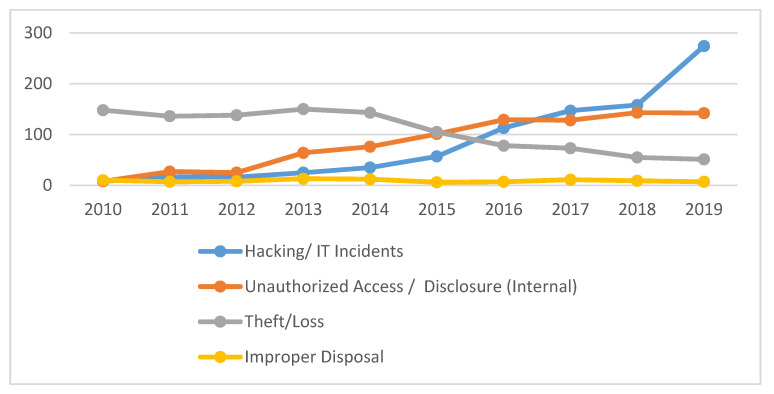
https://pubmed.ncbi.nlm.nih.gov/32414183/
How can all healthcare staff do their part to protect their patients?
While every health system continues to tighten down on controls to prevent cyberattacks (virus and malware protection, software patching, spam filtering), every employee – nurse, AP clerk, maintenance worker, etc. – must do their part to reduce the human error aspect. After all, even secure technological systems can be thwarted by untrained or inadvertent actions.
For example, phishing, a top scheme planted by hackers, preys on human behavior by impersonating a credible contact, often an authority figure, and prompting a response. To help reduce this, TAG’s VP of Business Solutions overseeing IT, put together this list to help against phishing attempts:

Are you being asked to send sensitive information via email? Legitimate senders do not request personal information such as passwords, social security numbers, or credit card numbers via email.

Is the email addressed to you? Most legitimate requests use your name rather than customer, member, account holder, etc.

What is the email domain? Is the email originating from the sender\’s correct domain? Hold your mouse over the email, without clicking, to confirm the email address and text match.

Are the spelling or grammar suspicious? Obvious spelling and grammar mistakes are a tip-off to a scam.

Is the email prompting you to click on a link? Most phishing e-mails convey a sense of urgency. Again, hover over the link (do not click) to confirm they match the address represented in the email.

Is there an unsolicited attachment? Were you sent a .zip or other attachment and a request to open from an unknown source?
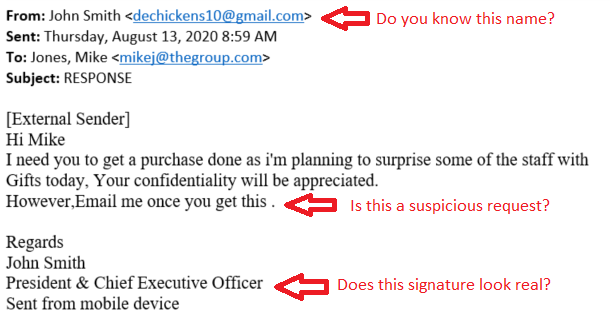
Each of these is a tip-off to a threat that can be avoided with extra attention. Examples like this can be used to tighten spam email rules – by yourself or your system administrator.
If phishing schemes are found, notify your IT department as soon as possible to reduce the threat of others within your organization falling victim.
Collective action is essential to protect data from increasingly stealthy threats. When everyone plays their part, we can all keep ourselves and our data secure from ‘dechickens’ out there.